Showing posts with label computers. Show all posts

Monday, April 5, 2021

Update: Wheelchair Computer Desk Feedback

 Back in February, we posted a blog describing the completion and delivery of our wheelchair computer desk to PathPoint. After a few weeks, we were finally able to get Mr. Meadth and Mr. Gil Addison together with his team to go over the design and get that long-awaited feedback.

Feedback from the end user is critical to the entire design process. For this particular project, the Academy had all sorts of unanswered questions: will the design function as requested? Does the screen angle suit a typical wheelchair user? How convenient is the keyboard position? Is the mechanical motion safe enough for general usage? Would a typical PathPoint resident be able to operate the remote control? What improvements could be made? While we don't currently plan on producing a Mk II, one project often leads into another and we improve our products by understanding their strengths and weaknesses.

Gil Addison (far right) together with his grateful staff

Mr. Meadth (center) joins in for the camera

Gil met Mr. Meadth together with six of the PathPoint staff members and together they went over the particulars of the design. You can watch the entire footage here, and a summary of design points is also included below.


As we draw this project to a close, thank you to PathPoint for being willing to work with us in an ongoing fashion! May our students always be inspired to use their God-given gifts with training and understanding, and we hope that the PathPoint residents are blessed through this simple gift.


Friday, January 29, 2021

Service Project: Mechanical Furniture

Freshmen Hans and Hunter, tools out

Even in the midst of a global pandemic, the Providence Engineering Academy follows a particular philosophy that transcends circumstances. While many robotics clubs and engineering programs might teach physics, maker skills, CAD, and more, we believe that these elements—fascinating as they may be—are only the means to an end. In the latest application form for the coming year, there are six "big ideas" listed; Big Idea Number 1 is that service matters:

As Christians, we have an obligation to turn our skills outward to the world around us; we learn not for our own sakes.
While we may not be allowed to mix cohorts or share equipment, the seventeen dedicated upper school students are committed to loving their community using their math, physics, coding, CAD, robotics, and maker skills.

Early on in the school year, we found two willing partners in this process: one was Mr. Gil Addison of PathPoint, an organization serving at-home and on-site residents, many of whom use a wheelchair each day due to their limited mobility. The other was Mrs. Christa Jones, 4th Grade teacher in the Providence Lower School. Both of these clients had distinct requests for custom-made furniture and it was the perfect opportunity for our students to put their new-found statics knowledge to the test (statics is the study of physically balanced situations where the net force is zero, such as buildings and bridges).

Mrs. Christa Jones, 4th Grade Providence Teacher

Mr. Gil Addison, PathPoint

Mr. Addison wanted a custom-made desk for an iMac computer that could be set to a lower height for a wheelchair occupant, and then back up to a standing desk height for an ambulatory user. Such a desk is hard to find in the current marketplace, and the engineering students saw an opportunity to provide something uniquely useful. The desk would be mechanically driven by a remote control, safe for an individual with limited dexterity, and functional to hold the computer at any height without concern.

By contrast, Mrs. Jones needed a new teaching desk at the front of her room to help meet the new style of a COVID year. This mobile desk would need to be equally useful in a standing or sitting position, for maximum versatility with her in-person and at-home students.

How to meet the needs of these clients in a year when the Engineering Academy is functioning in an independent-learning mode? How could we hold a meaningful design charrette when mixing between cohorts is prohibited? How can seventeen students come up with an agreed-upon detailed design and communicate it with the clients?

Answer: with creativity, technological tools, and a great attitude!

The students began by watching pre-recorded videos from the clients as they described their requests and necessary constraints to Mr. Meadth, the Academy Director. Mr. Meadth offered up some quick sketches and ideas in the videos to help sort through what would and wouldn't work.

Early notes for Christa Jones' project

Early notes for Gil Addison's project

The students then used LEGO and other construction materials to make quick miniature mock-ups of their ideas, along with sketches to help show functionality. The images were sent to the clients to help them think through the possible solutions at hand. Another round of recorded video reviews with the clients, and then the real design work began!

Alan's rolling cart concept

Kaitlyn's desk concept with extendable platforms

Together with Mr. Meadth, the students worked together over Zoom and in their grade level cohorts, using the cloud-based CAD tools from Onshape. With each student taking ownership of several parts from the whole, they worked collaboratively to produce something that could be presented back to client as a visualization and to the fabricator as dimensioned drawings. Teleios in 9th Grade can create the top part of the desk, Angel in 10th Grade can make the support struts, and Nolan in 12th Grade can design the platform for the keyboard. All team members can see how the pieces fit together in advance, spotting potential problems before a single cut is made. This kind of ease, speed, and confidence in the design process simply did not exist even five years ago, and we are glad for it!

(The computer desk for Mr. Addison can be viewed live here, and the rolling cabinet for Mrs. Jones here. Both models are interactive.)

Mrs. Jones' rolling cart CAD model

Mr. Addison's adjustable computer desk CAD model

So where are we today? After purchasing the plywood, oak, mechanical actuators, caster wheels, and other bits and pieces, fabrication is underway. The clients are now eagerly awaiting the delivery of their prototypes. Gil Addison's computer desk is nearly complete at the time of this article, and Zach in 11th Grade has put together a beautiful biscuit-joined red oak desk surface for Mrs. Jones' rolling cabinet.

James assembles the clamping mechanism for Gil's design

Teleios and Abby show off the parallel linkages

Nolan with the mechanical actuator

The vision nears reality for PathPoint!

Zach's red oak table surface (3 ft long)

We'll update this blog site as the projects are completed and delivered. For now, we're just glad to be able to continue our exciting mission through a pandemic and out the other side. The exhortation in I Peter Chapter 4 seems particularly apt:

Each of you should use whatever gift you have received to serve others, as faithful stewards of God’s grace in its various forms. If anyone speaks, they should do so as one who speaks the very words of God. If anyone serves, they should do so with the strength God provides, so that in all things God may be praised through Jesus Christ.

Keep on serving with the strength God provides, engineering students! You're making us all very proud. 

Friday, October 30, 2020

Physics, Freshmen, Furniture... and a Grant Win!

There hasn't been a lot of action on this blog site so far this school year—but not because there aren't things worth writing home about! As you can imagine, I (Mr. Meadth) have been much busier on the ground each day with cleaning and supervision, let alone teaching the engineering class.

But some things are worth documenting and celebrating. So let's jump in!

1. Four New Freshmen

We took four new engineering students into the freshman class. A big welcome to Hunter, Abby, Teleios, and Eliana. These junior engineers are hitting the ground running, despite all the challenges. They are learning trigonometry before their time, taking baby steps into the world of computer-aided design (CAD), and just generally being awesome. Welcome, freshmen!

Hunter, Teleios, and Abby (Eliana couldn't make this
photo, but she's just as much a part of this group!)

2. College-Level Statics... From a Textbook

Despite my propensity to always design my own curriculum from the ground up, I tried something new this year: a textbook! It turns out this was the perfect year in which to do this, as it matched well to the statics studies that we've always done anyway. Don't be led astray by the name—Statics for Dummies—the lighthearted tone helps high schoolers get through those pesky equations. For those engineering parents out there, you'll find all of the fun you can handle in vector calculations, force couples, and free-body diagrams.


3. Independent Mode

This is a grand experiment, and one that we committed to from the start of the year. Can we commit to a full year of engineering studies in independent mode? Some would say that it's never been tried, but this is the year to come up with new solutions! Despite the absence of stimulating classroom discussions, this has allowed students to take seven classes plus engineering, and it allows students to watch at their own pace. Students have watched 18 videos so far this year, and responded with written assignments and discussion boards. They are now eagerly discussing their community design project in a shared Google Doc, which brings us to Number 4...

Acceleration sums in three dimension, anyone?
If you can't find the centroid of a composite area,
you just can't call yourself an engineer

4. Community Design Project

I'm so happy with how this project is rolling forward! We have two "clients", Mrs. Christa Jones on the San Roque campus and Mr. Gil Addison at PathPoint, who works with residents in wheelchairs. Our student teams are busily designing an adjustable standing desk for Mrs. Jones and an adjustable computer desk for Mr. Addison. Both of these designs are required to involve electrical/mechanical aspects, such as motorized lifts or built-in LED lighting. Once the student teams finalize their designs, complete with drawings and CAD models, I (Mr. Meadth) will be building their designs myself—in the interest of staying as contact-less as possible.


5. Lots of Publicity

We've received a surprising amount of national-level publicity lately. Our students use the CAD platform Onshape, and Onshape reached out to us to record a video and write a blog article. The video has been up for a over a month now, and the blog article will be published soon. Our Academy was also mentioned in another national publication by the American Institute of Aviation and Aeronautics (AIAA), Aerospace America, because we won a $500 grant to help build our remote-controlled aircraft.


6. Major Grant Win

Is it just me that believes in our outstanding Providence engineering program? Is it just the university lecturers who receive our already-highly-trained students? Am I just blowing my own horn over here? Apparently not! The Toshiba America Foundation decided that our second-semester robotics project was something worth funding, and we are pleased to announce that over $4,000 of the very latest in classroom robotics equipment will soon be arriving on campus. This will be put to use in our Mars Rover project, where different student teams will design, build, and code different components of one big vehicle. I'm looking forward to this one. Thanks, Toshiba!

One of the advanced Vex V5 sets: coming soon!

As always, stay posted for more exciting announcements. Our junior engineers are doing something very different, but making the most of it. I'm confident that their skills and experience will remain at the very highest level amongst similar programs in our area. Keep it up, students!

--Mr. Meadth


Saturday, January 18, 2020

Coding Champs!

The following article appeared in the Santa Barbara News-Press on the 7th of January, written by Christian Whittle.


When Freshman Ruby Kilpper and sophomore Sydney Whited of the Providence School high school set out to develop an app for the Congressional App Challenge, they had a lot of ideas and not much time to choose one.

“We kept narrowing it down based on our skill level, what we thought we could do, and how much time we had,” said Sydney.

Eventually the two settled on Santa Barbara Volunteer Opportunities, a way for high schoolers to find volunteer opportunities in the area. And after a month of dedication their hard work paid off, winning the app challenge in Rep. Salud Carbajal’s 24th Congressional District.

Ruby and Sydney received the Congressional App Challenge award from Mr. Carbajal on Monday.

The annual coding competition for students was created to increase congressional awareness of computer science and STEM fields (science, technology, engineering and math).

Mr. Carbajal brought the two students to his Santa Barbara district office to honor their achievements and invite them to a reception at the House of Representatives in Washington, D.C.

“It’s a great opportunity to provide to our constituents and our young people, and it’s really cool to have young people from your district represented in Washington. We’re all very proud of you,” said Mr. Carbajal, D-Santa Barbara.

The pair are students in the Providence Engineering Academy. Launched in 2015, the academy, led by Rodney Meadth, serves as a springboard for students considering a career in math, science, or engineering disciplines. Participants enroll in specific classes from ninth through 12th grades.

Santa Barbara High School students won the challenge last year, but Providence stepped up the competition in 2019 by submitting eight projects.

“We’ve never gotten so many projects submitted from one school in particular, so obviously your teacher and your school had a lot to do with it and it just makes me feel really good about our future, the fact that you have a local school who’s really promoting coding,” Mr. Carbajal told the students.

The app Ruby and Sydney created for the competition, the Santa Barbara Volunteer Opportunities app, allows local nonprofits to post opportunities to serve, with details about age and time requirements, location, and the work needed from volunteers.

Users can use the app when they are interested in finding somewhere to serve. The pair wrote the app’s script in Java with 500 lines of code, and designed it mainly for use by high school students.

Sydney and Ruby were inspired to make the app by Providence’s annual day of service, in which students volunteer around the city, as well as Sydney’s experience volunteering with her mother for the Santa Barbara chapter of the National Charity League.

“I think it’s a great requirement to go out and serve your community, but sometimes it can be difficult to find opportunities to serve,” Ruby said.

The pair wanted to create a platform where students can reach out to organizations on their own to find different opportunities that work for their schedule and interests.

“We wanted to create an app that made the process easier and overall better for our community,” said Ruby.

“This was very innovative,” said Mr. Carbajal. “My staff and I, we went through them all, and yours was clearly at the top early on because it’s just so practical, and it’s so user friendly.”

Although they had some experience coding, it was the first time either of them had worked with Java. Sydney had tried coding in middle school and didn’t take to it, but this time around she and Ruby had a lot of fun. Both have been inspired to continue learning about coding as they think about college and the future.

With the limited time to come up with a concept and develop the app, Sydney and Ruby weren’t able to fit in every feature they wanted, like a search bar and map. Nevertheless, they’re proud of what they were able to accomplish.

The SBVO app is still in the development and testing stage and is not yet available for download, but Ruby and Sydney are considering finishing the project despite the Challenge having ended.

Established in 2015, the Congressional App Challenge is considered to be the most prestigious prize in student computer science, according to the CAC website.

Members of the House of Representatives host contests in their districts for middle and high school students, encouraging them to learn to code and inspiring them to pursue careers in computer science.

Participating House members each select a winning app from their districts, and each winning team is invited to showcase their winning app at the U.S. Capitol during the annual #HouseOfCode festival in the spring.

Since its inception, the CAC has inspired more than 14,000 students across 48 states to program an app. In 2019, 10,000 students registered for the competition, 2,177 created and submitted functioning apps, and 304 House members chose winners from their districts.

Sydney and Ruby will receive a $250 Amazon Web Service Credit. Their app and their names will be displayed on the Congressional App Challenge website. The House of Representatives reception will be the second time Sydney and Ruby have visited the Capitol, after an eighth-grade field trip to the city.

“Now you get to go back as winners!” said Mr. Carbajal.

email: cwhittle@newspress.com

Wednesday, October 16, 2019

Field Trip: Surreal Virtual Reality Studio


(The following blog article is first in a new series for this year, where each student in the Advanced Engineering II group is required to write a blog article on a recent field trip or related topic of their choosing. The first article comes from Joshua in 11th Grade.)

We thought space was the final frontier, but we were wrong. There is a new realm out there that is becoming readily available for exploration. Virtual reality is here, and it has been here for a while. Virtual reality, like it or not, is a growing part of world culture. It has grown so much that virtual reality arcades are becoming more and more popular.

The Advanced Engineering II class at Providence, myself included, had the opportunity to go to a new virtual reality arcade in Santa Barbara that is being developed by Mr. Whited. (Our field trip was for testing and educational purposes only, of course!) The studio had its grand opening on Thursday October 10th, and it is an experience fit for everyone, whether you want to have some family fun, a party, or just want to beat your high score that you were so close to beating last time you went. Mr. Meadth drove the group down to the intersection of Haley Street and State Street and we made our way over.

Joshua looks on as Nolan gets settled into his headset, ready for
a trip through the rings of Saturn!

Upon setting our eyes upon the testing site, the whole class was excited. We saw two stations for single-player games, one station for a two-player game, and two stations to host their four-player games. The Advanced Engineering II class was split up into two groups to play the four-player games.

The first game had us embarking on an expedition around Saturn as space rocks flew past. The second tested the fight inside of us as we were sent down an alien-infested river on a raft. Sadly, we had to make it back to school in time for pick-up.

Alex at Surreal Virtual Reality Studio sets up Sam and Pedro
with hand controllers and headset

Reflecting on the experience, Pedro remarked that “it was pretty amazing and fun. It was just a fun experience seeing how technology has improved.” Nolan afterwards said that it "was pretty cool. It was my first time using virtual reality so I didn’t really know what to expect. I thought it was a really fun experience. I also think that virtual reality will be a really useful tool in the future.”

Nolan was right about virtual reality becoming a useful tool, and in actuality it already is one. Virtual reality has some really amazing uses that are only just being made widespread. For example, teachers are able to use Google Cardboard, a cheap virtual reality setup which uses your phone as a screen, to take their students on virtual field trips that they wouldn’t be able to do normally. At the University of Westminster, criminal law professors use virtual reality simulations to teach their students how to hunt for clues and construct a murder case in a realistic scenario. Trade schools are able to use virtual reality to teach their students as well.

Virtual reality used to be a thing of the future. Now it is a thing of the present. It is coming quickly with surging popularity. It isn’t something to be afraid of, especially with all of the great uses for it. Virtual reality is something to be embraced for its dual ability to entertain and to educate.

(Surreal Virtual Reality Studio is open for business at 436 State Street, Unit B, just behind the Craft Ramen restaurant. Their October special pricing is still available, and you can make a reservation on their website. Thank you Mr. Whited for the chance to preview it!)

Sunday, July 7, 2019

Summer Camp 2019

This summer, the Providence Engineering Academy once again hosted the very special Robot City summer camp. With assistance from four capable high school engineering students (Alena, Davis, Pedro, and Zach), Mr. Eves and Mr. Meadth put on an unforgettable experience!

(Please note that all photos in this article have been selected to avoid showing camper faces, since not all students are from Providence with a photo release. Apologies if you're looking for your loved one's smiling face!)

Day 1: Architecture
After breaking into four teams, each group selected the theme for their quadrant of Robot City. The Green Team chose Time Travel, the Blue Team settled on a Medieval Castle, the Yellow Team laid out an Alien Attack on the Beach, and Red Team was Future City. A quick lesson of folding geometric nets, and all campers from 3rd to 7th Grade were ready to build!

The skyline emerges! A colorful mess of card and tape!

Red Team's skyscraper went up and up and up, and needed to be
tied down with guy ropes!

Blue Team's "Nice No-Trap Castle". Should we believe them?

With inspiring challenges like "Tallest Tower" and "Most Colorful", each team worked hard to lay out their cities. Skyscrapers rose up six feet into the air, zip lines were strung out, and spaces carefully divided out.

Day 2: CAD and 3D Printing
It might sound complex, but physically printing CAD (computer-aided design) models is something within the reach of any elementary student! Mr. Meadth taught the campers how to use Tinkercad, a free in-browser design tool created by AutoDesk. Designers can use simple shapes such as cylinders, cones, spheres, and prisms to create more complex models, such as houses and rocketships and characters.

Two of our campers work on their CAD models (Owen's model
on the right is shown in detail below)

This is a great tool to get kids thinking in terms of linear dimensions, negative and positive space, perspective, volume, and it's just plain creative fun! Here are a couple of examples of what the kids came up with. We also had spaceships, tanks, flying cars, and castles. Wow!


Once created (the models above took the students less than an hour to build), the designs were sent to the 3D printer. At a small enough print size, most models were done in about an hour, in a range of colors. Of course, after the camp the students got to keep whatever they have printed!

It's just as addictive as watching TV, but at the end of the program
there's actually something to show for. Thanks, Raise3D!

Day 3: Electrification
Always a favorite! Mr. Meadth gave a quick lesson on simple circuits, explaining terms such as "LED", "voltage", "series", and "parallel". Each team was given a supply of copper tape, coin batteries, and LEDs, and shown how to connect them together to power their city. It wasn't long before the entire room was lit up with red, blue, orange, white, and green!

A lovely beach paradise in the shadow of the skyscrapers
(the tidal wave was added later)

The Green Team's time travel zone included some helpful signs
(because time travel can be confusing)

A scale replica of the Golden Gate Bridge, courtesy of Abigail

All teams took up the extra challenges as well, building working paper switches, including both series and parallel circuits, and working to match their lighting arrangements to their theme. Blue Team created "laser traps" for their medieval castle, and Green Team strung out a long neatly-lit road to mark out their different time travel zones. Billboard were illuminated and "stained-glass" windows lit from the inside.

Mr. Eves works on the Blue Team's medieval quadrant
LEDs don't come through well in photos, but you get the idea!

When parents arrived for pickup on Wednesday, the lights went out, and the party started!

Day 4: LEGO Robotics
What's a Robot City without robots? This year, Mr. Meadth and Mr. Eves guided the campers on how to incorporate LEGO Mindstorms robotics sets. Rather than creating robotic systems that would move around (and potentially destroy delicate buildings and circuits!), the teams focused on stationary mechanical systems. Mr. Meadth gave some lessons on essential mechanical systems (bevelled gears, gear reductions, universal joints, cams and cranks, etc.), issued some fun challenges, and away they all went!

Does this look like anybody's bedroom floor? Times it by 16.

A futuristic monorail glides around Green Team's city buildings

What's a medieval world without an authentic, functional windmill?

We were blown away by all of the amazing creations that campers and their team leaders built: several working elevators (with tracks and with pulleys/windlasses); a slowly rotating time travel portal (sadly not actually functional); a crank-powered shooting spaceship; an amusement park ride; drawbridges; a merry-go-round; several demolition machines!

(P.S. For any parents of elementary students wanting a more cost-friendly version of LEGO Mindstorms, I highly recommend LEGO Boost. At about $150, it is a somewhat simplified system, still with sensors, motors, and fully programmable using a block-based system. The only downside is that it does always need a tablet/phone/computer app to be running via Bluetooth to make it work.)

Day 5: Do Over
At this point in the camp, the kids have learned so many different things and have typically gravitated towards one or the other. Some of them think that LED illumination is the coolest thing, and others just can't get enough of making CAD models online. So on the fifth day, Mr. Meadth and Mr. Eves issued a few more challenges of various sorts. The teams helped put together a welcome sign with their photo on it; they all constructed a wearable accessory lit up with more lights and batteries. Some made hats and funky glasses and others made glowing swords!

The fun keeps coming on Day 5!

Robot City continued to grow in complexity and variety. Some teams incorporated sensors into their robotic systems, using touch triggers and infrared detectors to more accurately control their elevators and bridges.

By the time parents arrived at 12:30, the teams were ready for the final wrap-up. All points were tallied, and the all-girl Green Team took the grand prize, much to their delight!

Parents were delighted to see everything
the kids had accomplished... and that
someone else was handling the cleanup!

Mr. Meadth and Mr. Eves would like to thank all families for making our third Robot City camp such a success! We intend to run this again in 2020 (new ideas are already in the works!), so please spread the word amongst family and friends. You can start by sharing this article with someone who might be interested! And remember, this camp is open to all students, not just those from Providence. We're always glad to welcome new friends from outside our regular community.

Until next year, may these junior engineers keep on designing and keep on building!

Wednesday, January 23, 2019

When Things Go Wrong, Could You Lend Me a Hand?

There's a great deal of discussion right now in educational circles about the positive benefits of failure. You don't have to look far to find TED talks, psychological reviews, and blog articles on why it's okay--and even beneficial--to fail. Failure, we read, makes us stronger, fights against complacency, and recommits us to our goals. The warnings are shouted loudly: Parents! Don't shield your kids from failure! Our own faculty member, Carri Svoboda, shared an article earlier this year about why women in particular might be afraid to fail.

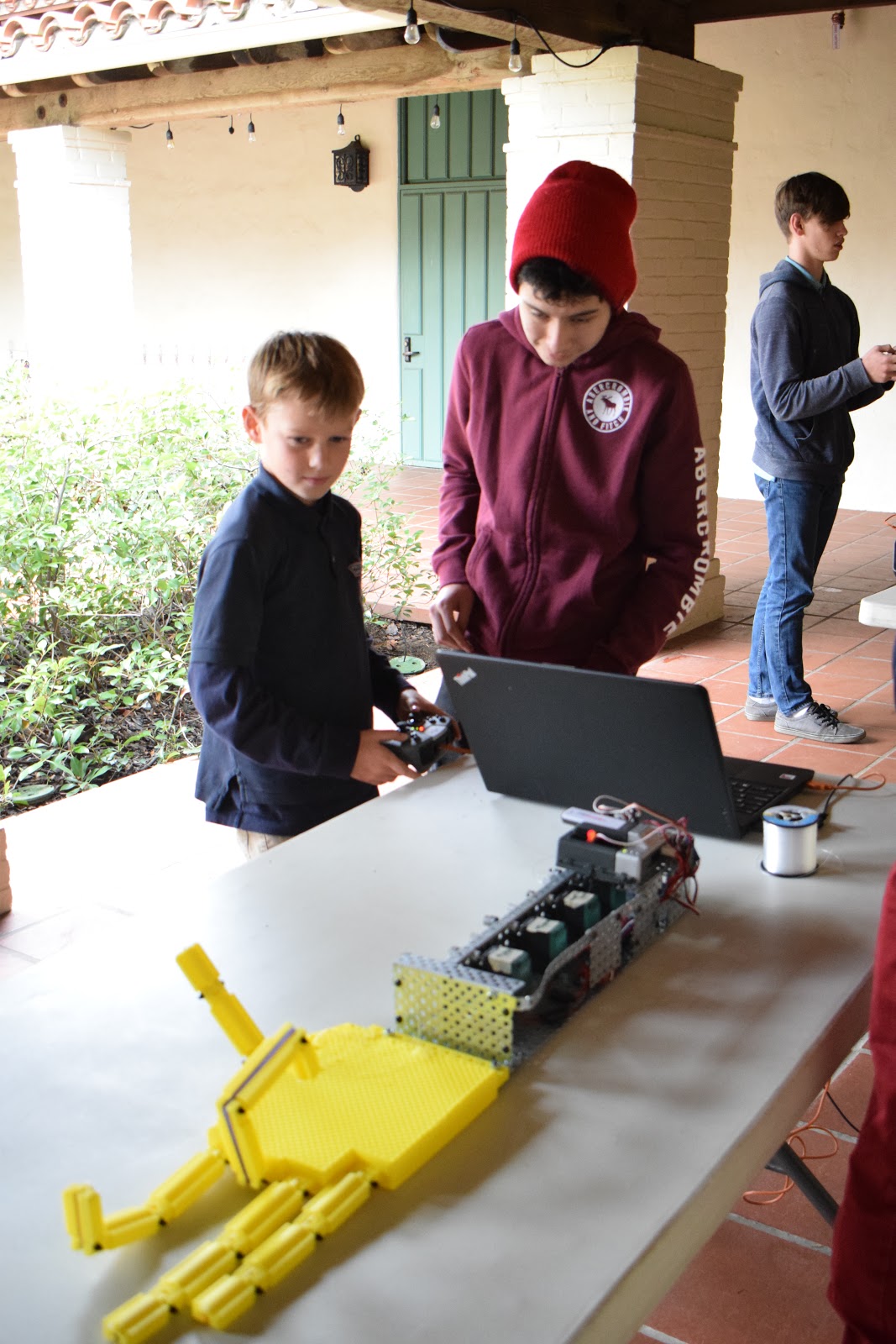
The Foundations of Engineering II class in the Providence Engineering Academy were recently given a new project to wrestle with: design and build a robotic prosthetic arm. Using metal motors and controls for the forearm frame, they then had to 3D print a functional palm, fingers, and thumb. No instructions, and nothing off-the-shelf. Oh, and with one more twist--the entire thing was made double size.

James and Zach prepare the Pink Team's hand

Isaiah and Kaitlyn working on the finishing touches

So what happens when you give a room full of budding engineers a bunch of robotics parts and computers and a 3D printer? Well, for one, a lot of failure. Dead ends and broken components are commonplace. The line of code that worked yesterday doesn't work today. The team member that needed to design their part in time just doesn't. Control wires break. Batteries die. Entropy seems to work harder than its usual self.

And that's okay!

Davis shows Alan his giant metal forearm; the green boxes down
the side are the motors to control the 3D-printed fingers

The teams worked hard for seven weeks. During this time, they also visited PathPoint, a nearby organization dedicated to working with those needing assistive technology--the original inspiration for this robotic limb project. The direct experience with those who daily use technology to overcome their difficulties was very moving.

The whole group visiting PathPoint, non-profit working here in
Santa Barbara with those needing assistive technology

When all was completed, the four teams loaded up into the school vans, and headed over to the San Roque campus. Their giant articulated hands waved a cheery hello to cars driving by, fingers flexing and twitching in eerie mimicry.

Pedro shows the Yellow Team's code to a
Lower School student

James checks the workings of his pink articulated fingers

The class presented their designs to the 3rd, 4th, 5th, and 6th Grades across two days. On the first day, failure was the name of the game, as every team experienced the frustration of things going wrong. To name just a few of the dozens of problems:
  • A control line connecting a motor to a finger broke or came untied.
  • A stop keeping a finger from bending backward broke away.
  • An elastic band returning the finger to neutral position broke.
  • A remote control, necessary for demonstration, would not "pair" with the onboard computer.
  • Another remote control was left behind in the engineering classroom!

Nolan, chief coding specialist for the
White Team

A myriad of challenges--yes! More importantly, how did the students respond?
  • They switched to manual operation instead of motor-controlled.
  • They took extra time to talk to their elementary-aged guests about 3D printing and robots.
  • They used tape and scrap pieces to rebuild a finger stop.
  • They retied control lines, anchoring them with bolts and washers.
  • They avoided focusing on the problems, and drew their audience's attention to what was working.
Our 5th Grade teacher, Mrs. Suleiman, shared her highlight of the experience: "Hearing the students talk about the 'failures' that happened as they were designing the hands, and watching them deal with problems that occurred during their demonstration."

Lower School students take a turn wiggling the giant fingers
back and forth with the remote control

The students themselves reflected on this very same idea a few days later:

Pedro: "There will always be failure. Failure is good. You learn from it."

Zach: "Perhaps it is not our mistakes that are the true failures, but the ways that we handle our mistakes that are."

Alan: "The point of this isn't about how many failures we have, but how we deal with them."

Isaiah: "All this goes to say that every problem has a solution. You just have to be willing to persevere."

And persevere they did. On the second day of presenting, most of the kinks had been worked out. With smiles on their faces, our 9th and 10th Graders talked at length about their coding and CAD. The elementary students were able to take turns at the controls and wiggle those giant fingers back and forth. What a joy to see older students inspiring the younger ones with warmth and kindness!

Nolan helps our Lower School students
operate the arm

Our closing thoughts come from Sydney (9th Grader), who wrote some powerfully encouraging thoughts for all of us:

"I know that even in my academic journey at Providence, I have failed many times... This seems like the world can end, yet once you rise up and decide to learn from those failures, you really do learn the most... Through the project of making a robotic hand, I understand that failing is normal and is bound to happen at some point... I have learned that I need a team or a group who can help me when I fail. I need to give myself grace when I do fail... I am grateful for this experience and the hand that was our outcome, even if it was losing a few nuts and bolts by the end. Great work, team!"

Monday, October 22, 2018

Robots Head to Head

In the Providence Engineering Academy, we take care of a lot of serious business. We use trigonometry to calculate vector components. We learn how Rene Descartes' philosophy paved the way for a flawed view of "the ghost in the machine". We learn how to identify fixed, hinged, and simple supports in typical static structures.

And some days, we just get out there and have head-to-head robot wars!

James gets excited as teammate Nolan drops
one in the bucket!

The challenge: set up a metal remote-control robot to collect as many tennis balls as possible in eight minutes.

The setting: the wooden deck behind Mr. Rottman's room.

The outcome: a whole lot of high-energy fun! (And possibly some learning along the way.)

One robot encounters the harsh realities of the laws of physics...
a quick flip of the claw and it's back in the game!

After a week of careful coding, mechanical modification, and practice, each of the four teams was ready to enter The Pit. Programmers had gone over scores of lines of code in search of errors and optimizations. Extra bits and pieces were judiciously selected and bolted on. Optimistic 9th and 10th Graders jubilantly walked their robots across the yard to be tried against each other: head to head to head to head!

What do you do when your claw stops working in the middle
of the game? Teacher to the rescue!

The first round was not without its upsets. The whistle blew, and three robots sprang to life, but Sam's robot just refused to launch. Mr. Meadth waded through a morass of error messages to find that Sam had inadvertently typed extra characters into his code as he had walked over. A quick fix and back in business!

Sam brought the team back to life despite the time lost, scoring double points along the way to finish with seven total. But nothing could touch Pedro, who expertly picked up no fewer than ten balls!

Joshua places his ball with infinite caution
as Pedro and Sam look on

With help from Claire and Josh, our dedicated senior teaching assistants, the field was reset, and new operators stepped up. After a quick reminder of which buttons did what, the robots roared to life again. Sydney managed to best her teammate's score from four to five, but no one could touch Pedro's teammate, Joshua, who matched his performance with another ten!

James steadies the bucket while Caleb
drops another one in--illegal move?

For the final round, the controls were passed to James, Alan, Sam, and Kaitlyn. Kaitlyn managed to score six, which was impressive enough, but Alan beat her out by one to make seven... and James roared from behind to lead his team to a victorious ten!

Sydney and Kaitlyn felt this way after each
and every ball

Well done to all team members! You coded and designed and built and redesigned and rebuilt. Well done on working together towards the end goal. Final scores are as follows:


Round 1Round 2Round 3Total
Davis4Sydney5Kaitlyn615
Pedro10Joshua10Sam P.424
Nolan5Caleb4James1019
Sam K.7Zach2Alan716

Well done to Pedro, Joshua, and Sam, winning two out of three rounds and getting the highest cumulative score overall. Our next major robotics project will turn our attention to more sober-minded matters. How can robotics technology be used to help the weak and unfortunate? Stay tuned to find out!